


POS Software for Smarter Sales and Business Management
Running a business becomes easier when sales, payments, stock, customers, and reports are managed from one place. POS software helps businesses organize these daily tasks while making the checkout process faster and more accurate. From retail stores and restaurants to cafés, pharmacies, and service businesses, a modern point of sale system can improve efficiency and give owners better control over their operations.
Instead of relying on handwritten records or separate spreadsheets, businesses can use connected software to manage transactions and access useful information when they need it.
What Is POS Software?
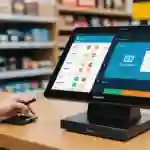
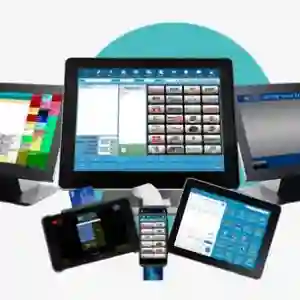
POS software is a digital system used to process sales and manage business transactions. It usually works with hardware such as a touchscreen terminal, barcode scanner, receipt printer, cash drawer, and payment terminal.A modern POS system can do much more than record a sale. It can manage inventory, customer information, employee access, discounts, refunds, taxes, and business reports.
How Does POS Software Work?
When a customer selects a product or service, an employee can scan or choose it from the POS screen. The system calculates the price and applies relevant discounts or taxes.After payment is completed, the transaction is saved. If inventory management is connected, the This creates a smooth flow between sales and other business activities.
Why Businesses Use POS Software
Manual sales management can take significant time and may lead to calculation or recording errors. POS technology helps businesses automate many routine activities.The main advantages include:
- Faster transaction processing
- More accurate sales records
- Better inventory control
- Easier payment management
- Detailed sales reporting
- Improved employee control
- Better customer service
- Reduced manual administration
A business can choose features based on its size, industry, and daily workflow.
Key Features of POS Software
Every POS solution is different, but several features are commonly important for modern businesses.
Sales and Payment Processing
A POS system makes it easier to calculate totals, process payments, apply discounts, and handle refunds.Depending on the setup, businesses may support cash, cards, digital payments, and other available payment methods.A simple checkout process can reduce waiting times and create a better customer experience.
Inventory Management
Inventory tracking is especially important for businesses selling physical products.A POS system can update stock when products are sold and provide information about current quantities. Managers can identify popular products and notice when stock levels are becoming low.This can help businesses plan purchases and reduce the risk of running out of important products.
Employee Management
Businesses with multiple employees can create separate user accounts and assign different permissions.For example, a cashier may only process sales, while a manager can access reports, inventory, refunds, and pricing settings.Role-based access can improve accountability and help protect sensitive business information.
POS Software for Retail Businesses
Retail stores often manage large product ranges and need fast checkout processes. POS software can connect barcode scanning, product information, pricing, inventory, and sales reporting.
Improve Retail Operations
Retailers can use sales data to identify fast-moving products, monitor stock, and understand customer buying patterns.
Businesses with several branches may also benefit from centralized reporting, allowing managers to compare sales and inventory across different locations.
POS Software for Restaurants and Cafés
Restaurants require features that are different from traditional retail stores. A restaurant POS system may include menu management, table tracking, kitchen orders, takeaway, delivery, and bill splitting.
Connect Front and Back of House
Staff can enter orders directly into the system and send them to the kitchen. This can reduce mistakes caused by handwritten orders and improve communication.Managers can also review sales information to identify popular menu items and busy service periods.
Cloud-Based POS Software
Cloud-based POS software stores information using online infrastructure. Authorized users can access certain business information from different locations.This can be useful for owners managing several branches or teams working across different locations.Before selecting a cloud POS solution, businesses should review security, backups, internet requirements, user permissions, support, and ongoing costs.
POS Software and Business Reporting
Business reports turn daily transactions into useful information. A POS system can provide reports about sales, payments, refunds, discounts, taxes, products, and other activities.
Make Better Decisions With Data
Instead of guessing which products are performing well, managers can use actual sales information.
Reports can help answer questions such as:
- Which products sell the most?
- What time of day is busiest?
- Which items need restocking?
- How much revenue comes from different payment methods?
- Which branch is performing better?
These insights can support better decisions about stock, staffing, promotions, and pricing.
POS Software and Semantic SEO
Businesses publishing POS-related content should explain the complete topic instead of repeating one keyword throughout the page.Related terms such as point of sale system, retail POS, inventory management, payment processing, sales reporting, barcode scanning, customer management, employee permissions, and business automation can be included naturally where relevant.Google's people-first approach favors useful information created to help visitors. Clear explanations, original examples, logical headings, and direct answers can make a page more valuable than content written mainly to repeat keywords.
Content for AI Overviews and Modern Search
For AI-powered search experiences, businesses should focus on accurate information and clear answers to real questions. There is no guaranteed shortcut for AI Overviews, GEO, or AEO.A strong POS page should explain what the software does, who needs it, important features, implementation considerations, security, costs, and common use cases. This gives readers and search systems a clearer understanding of the subject.
Choosing the Right POS Software
Businesses should not choose a POS system simply because it has a long list of features. The solution should match the company's actual workflow.
Before making a decision, consider:
- Business type and size
- Number of employees
- Number of locations
- Inventory requirements
- Payment methods
- Reporting needs
- Hardware compatibility
- Required integrations
- Security features
- Customer support
- Total cost
A scalable system can also make future expansion easier.
Modern POS software Pakistan businesses use can streamline sales, inventory, payments, customer records, and reporting from one efficient platform.
Frequently Asked Questions
What Is POS Software Used For?
POS software is used to process sales, manage payments, track inventory, create reports, and organize other business activities such as customer and employee management.
Is POS Software Good for Small Businesses?
Yes. Small businesses can use POS software to simplify checkout, manage stock, track sales, and reduce manual administration. The system should match their budget and operational needs.
Can POS Software Manage Inventory?
Many modern POS systems include inventory management. Stock can be updated after sales, while reports can help businesses identify fast-moving and low-stock products.
Can POS Software Handle Multiple Locations?
Many systems support multiple branches and centralized reporting. This allows owners and managers to review information from different locations through one platform.
Is Cloud POS Software Secure?
Cloud POS security depends on the provider and how the system is configured. Businesses should review authentication, access controls, backups, encryption, data policies, and available security measures before choosing a solution.
Key Takeaways
POS software can bring important business activities together in one organized system. By connecting sales, payments, inventory, customers, employees, and reporting, it can reduce manual work and provide better visibility into daily operations.
For retail businesses, POS technology can improve inventory control and speed up checkout. Restaurants and cafés can use it to manage orders, tables, menus, and kitchen communication. Growing businesses can benefit from centralized reporting and multi-location management.
The most effective POS solution is not necessarily the one with the most features. It is the one that fits the business, is easy for employees to use, supports required payment and inventory processes, and can grow with future needs.
Businesses should also consider security, customer support, integrations, hardware compatibility, and total ownership costs before making a final decision. Testing a system with real workflows can reveal problems that may not be obvious during a basic demonstration.
For websites promoting POS solutions, useful and original content is equally important. Pages should answer genuine customer questions, explain features clearly, and provide practical information without excessive keyword repetition.
Final Thoughts
POS technology has developed from a simple checkout tool into a broader business management solution. Today's systems can help companies understand sales, control inventory, manage employees, organize customer information, and make decisions using real business data.
However, software alone does not guarantee better results. Businesses need to select a solution that matches their operations and train employees to use it correctly. Regular updates, secure access, reliable backups, and ongoing performance reviews are also important.
When the right technology is combined with well-planned processes, POS software can save time, improve accuracy, strengthen customer service, and provide valuable insight into business performance. For businesses planning their next stage of growth, choosing a practical and scalable POS system can be a smart step toward more organized and efficient daily operations.
Explore trusted industry resources for practical business insights, technology guidance, and management solutions.